

현재 위치
홈

상품상세정보
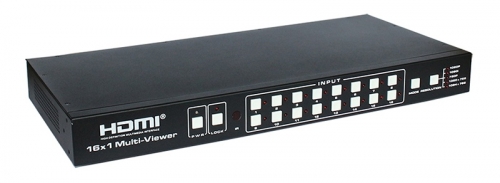
1080P HDMI Seamless Switcher 16X1 with Multi-Viewer 16 in 1 out hdmi 1.3 hdcp 1.2 support Panel key IR RS232 control
1.Introduction
This product is a high performance 16 by 1 Multi-Viewer with seamless switcher. It supports sixteen High definition input source display on one screen. As a switcher, it can also seamlessly switch the sixteen HD input freely. The product can be controled by various ways, through the front panel button control, IR control, RS232 control etc.
2.Features
Compliant with HDMI 1.3a,HDCP 1.2;
Supports multiplexed HDMI 16-input and 1-output;
Supports up to 1080p High Definition resolution;
Support 16by1 Quad Multi-viewer and seamless switch;
Support scaler up, scaler down function;
Support multi output resolution;
Support digital audio format LPCM/AC3/DTS
Support button, IR Remote,RS232 etc various controlled ways;
3.Package Contents
HDMI 16x1 Multi-Viewer 1pc
12V/5A DC power adaptor 1pc
RS232 Cable 1pc
Operation Manual 1pc
4.Specifications
Video Bandwidth 2.25Gbps
Input Ports 16 × HDMI (Female type),1x RS232;
Output Ports 1 × HDMI (Female type),
Audio output PCM2, 5.1, 7.1CH, Dolby 5.1, DTS5.1
Input Resolution 480i60Hz,480p60Hz,576i50Hz,576p50Hz,720p50/60Hz,1080i50/60Hz,1080p24/30/50/60Hz,800x600@60,1024x768@60,1280x720@60, 1920x1080@60;
Output Resolution 1080p,1080i,720p,1024x768,1360x768
ESD Protection Human Body model:±8 kV (air-gap discharge) ±4 kV (contact discharge)
Power Supply 12 V/5A DC
Dimensions 440 mm (W)×200 mm (D)×45 mm (H)
Weight 1800 g
Chassis Material Metal
Silkscreen Color Black
Operating Temperature 0 °C~40 °C/ 32 °F~104 °F
Storage Temperature −20 °C ~ 60 °C/−4 °F ~140 °F
Relative Humidity 20~90 % RH (non-condensing)
5. PANEL FUNCTIONS
5.1 Front Panel

1. POWER:Press this button to power the device on/off. The LED will illuminate green when the power is on, red when it is in 'Standby' mode.
2. LOCK:Press this button to lock all the buttons on the panel, press again to unlock. The red LED will illuminate when the button is locked, on the contrary, turn dark when unlock.
3. IR receiver window:Receive the IR from the remote controller.
4. HDMI input selection button area:HDMI input selection button 1 to 16:Press to select the input from 1 to 16.
5. MODE: Press the button to select display mode.
6. RESOLUTION: Press the button to select the output resolution.
NO. | RESOLUTION |
1 | 1080P, Main image audio |
2 | 1080I, Main image audio |
3 | 720P, Main image audio |
4 | 1360x768, Main image audio |
5 | 1024x768, Main image audio |
5.2 Rear Panel

1. HDMI INPUT Area:Connect HDMI sources. LED 1-16 illuminate when the HDMI signal plug in corresponding input port with HDMI cable.
2. HDMI OUTPUT Area:Output for displays, AVR etc. LED illuminate when the display plug in corresponding output port with HDMI cable.
3. PC CONTROL:RS232: Connect to a PC or control system with D-Sub 9-pin cable for the transmission of RS-232 commands.
4. IR EXT:IR extender receiver port, connect with IR receiver cable.
5. DC POWER IN: Plug the 12V/5A DC power supply into the unit and connect the adaptor to an AC outlet.
6 .Detail description of display mode
The 16x1 multi-viewer have 2 display modes.
MODE1: The 16x1 multi-viewer divides the sixteen HD input to the same size and display on one screen. And now switch the input button on front panel or IR remote, the HDMI output audio will Corresponding to the selected input source.
MODE2: The 16x1 multi-viewer will separate display the sixteen HD input, and now it is a seamless switcher.


7. PC controller user guide
Installation
The PC controller is green software. Just use a cable to connect the PC via RS232 port and copy “Quad Multi-Viewer.exe” to PC to complete installation.
Preparation
1. Connect PC and multi-viewer by RS232 cable (headers of both sides of cable should be FEMALE)
2. Power-up multi-viewer
3. Double click “Quad Multi-Viewer.exe” icon to run it

1. Select PC connect COM port,Click to connect or disconnect PC and multi-viewer.
2. Select the HDMI output resolution.
3. Select the input source.
4. Select the output mode, see the detail description (chapter 6).
5. Adjust the HDMI output picture quality.
6. Display or hidden the OSD menu.
7. FW upgrade part: Click to open Firmware. The click the upgrade button, the new firmware will auto download to the multi-viewer and restart it.
8. Press the Reset button, the quad multi-viewer will reset to factory state.
8. Operate and Connect


배송안내
- 15:00시 이후주문은 다음날 배송출발합니다.
롯데택배(℡: 1588-2121 | ※운송장조회시 클릭) 를 이용하고 있으며 기본 착불입니다.
- 주문하신 제품이 소량이고 택배비 선불로 구매시 4,150원입니다. (선불선택) - 상품에 따라 택배비가 비쌀수도 있습니다.
일부제품은 화물[대신/경동]으로 착불로만 발송이 가능합니다. 받으실지점을 배송메세지에 남겨주세요.[전화문의바랍니다.]
- 군부대: 반드시 선불입니다. 구입시 문의바랍니다.
무료배송조건: 구매액이 15만원 이상일경우 무료입니다
제품중에 "착불" 표기가 되어 있으면 제품별 배송조건이 우선입니다.
단, 제주및 기타 도서산간지역은 부피 및 무게에 따라 배송비 추가될수도 있습니다.
- 제주도전역: 항공요금 3,000원추가
- 기타도서지역: 배송비가 자동으로 추가될 수 있습니다.(도선료등으로 인하여 택배사에서 추가)
1. 입금확인 후 1~3일 정도 상품 준비기간이 소요되며, 주문량이 많을 경우 준비기간이 조금 더 소요될 수 있습니다.
2. 결제일(카드결제일, 무통장입금일)을 기준. 주문일 포함 5일 이내에 상품을 받으실 수 있습니다. (보통1일이면 가능합니다.)
(예외사항: 주문제작상품은 주문전 문의바랍니다.)
※ 해외배송은 주문하신 상품무게는 별도 측정 후 주문상품 구매액 + 운임료와 함께 결제해주셔야 합니다.
교환 및 반품안내
1. 상품
출하 전 환불요청시 처리는 1~2일정도 소요되며,
배송이 진행중이거나 완료된 후에는 상품이 회수된 날짜로부터 3일 이내에 처리됩니다.
2. 교환 및 반품이 가능한 경우
- 제품을 수령한 날로부터 7일
이내로 제품초기불량&파손의 경우
- 제품의 박스,
포장상태, 내용물에 이상이 없을 경우 반품가능
- 삼성테크윈제품의 경우 제품이상시
삼성테크윈A/S를 먼저요청하여 교환및반품 판정후
처리해드립니다.
3. 교환&반품이 불가능한
경우
- 제품의 멸실 또는 훼손된
경우와 내용물(설명서,케이블등)이 없는 경우
- 제품의 사용 또는 일부 소비에 의해 제품의 가치가 현저히 감소한
경우
- 재판매가 곤란할정도로 시간이 경과하거나 박스 및 제품에 이상이 있는 경우
- 주문제작된 제품이거나,
주문구매제품(예; 수입제품)일 경우 반품불가
- 제품의 박스/라벨/포장등의 훼손/구성품, 수선, 폐기등은 교환/반품불가
- 제품박스에 택배송장이나 테이핑하여 제품박스를 훼손하는경우 교환/반품불가[별도박스에 재포장후 포장박스에 송장부착요망]
- 일부 특가 상품의 경우, 인수 후에는 제품 하자나 오배송의 경우를 제외한 고객님의 단순변심에 의한 교환, 반품이 불가능할 수 있사오니,
각 상품의 상품상세정보를 꼭 참조하십시오.
4. 주문하신 상품에 하자가 있거나 제품설명과 다른상품의 배송시에는 제품교환 또는 환불처리
5. 고객님의 변심에 의한 교환 또는 반품의 경우 이에 소요되는 운송비용은 고객님께서 부담하셔야합니다.
6. 환불시에는 무통장입금은 통장으로환불, 신용카드 및 계좌이체는 각각 승인취소되어집니다.
환불안내
- 상품 청약철회 가능기간은 상품 수령일로 부터 7일 이내 입니다.
단, 아래의 경우에는 환불이 불가합니다.
- 주문제작된 제품이거나, 주문구매제품(예; 수입제품)일 경우 환불불가
- 제품의 멸실 또는 훼손된 경우와 내용물(설명서,케이블등)이 없는
경우
- 제품의 사용 또는 일부 소비에 의해 제품의 가치가 현저히 감소한 경우
고객님의 변심에 의한 교환 또는 반품의 경우 이에 소요되는 왕복운송비용(반품신청시 고지)은 고객님께서 부담하셔야합니다.
AS안내
보증기간 신청 | 보증기간은 구입일을 기준으로 산정되며, 구입 영수증 및 쇼핑몰 시스템 정보를 통해 구입일을 확인 합니다. 본체의 보증기간은 구입일로 부터 1년입니다. |
다음의 경우 별도 기준이 적용됩니다. - 소모성 자재(커넥터, 케이블등)제외 | |
유무상 규정 | 무상수리 : 보증기간 이내에 정상적인 사용중 발생한 고장증상 |
유상수리 - 보증기간이후에 발생된 고장 - 고객의 사용상 부주의 또는 고의로 발생된 고장 - 당사 외에서 임의 수리되었거나 구조/성능개조로 인한 고장 - 천재지변(화재, 지진, 풍수해, 낙뢰, 해일 등)으로 인한 고장의 경우 - 침수 또는 이물질 오염 등으로 인한 부식 - 사용전원의 이상 또는 연결기기의 불량으로 인한 고장의 경우 | |
이미지 확대보기
HMX-1616 [16x1 HDMI 16분할기 HDMI 16CH QUAD-수입]
비밀번호 인증
글 작성시 설정한 비밀번호를 입력해 주세요.
확인장바구니 담기
상품이 장바구니에 담겼습니다.
바로 확인하시겠습니까?


